Design System for 6 Internal Apps
Turning a loose collection of design references into one system of 30+ reusable components, like buttons and menus, built to match the developers' code and shared across 6 internal apps.
- Problem
- Every internal app was designed from scratch, so patterns drifted, common controls were rebuilt, and teams had no shared reference.
- My Role
- Led the redesign of the design library: foundations, components, prototyping patterns, and usage standards. Worked with designers, business analysts, and the development team · 2024–2026 · Used by 18 people: 3 designers, 5 business analysts, and 10 developers
- Tools
- Material Design 2 (Google's design guidelines) · MudBlazor (the developers' library of ready-made code parts) · Figma · Figma Make (Figma's AI tool that builds clickable prototypes)
- Outcome
- One shared system of 30+ components across 6 internal apps, used by designers, business analysts, and developers.


The Challenge
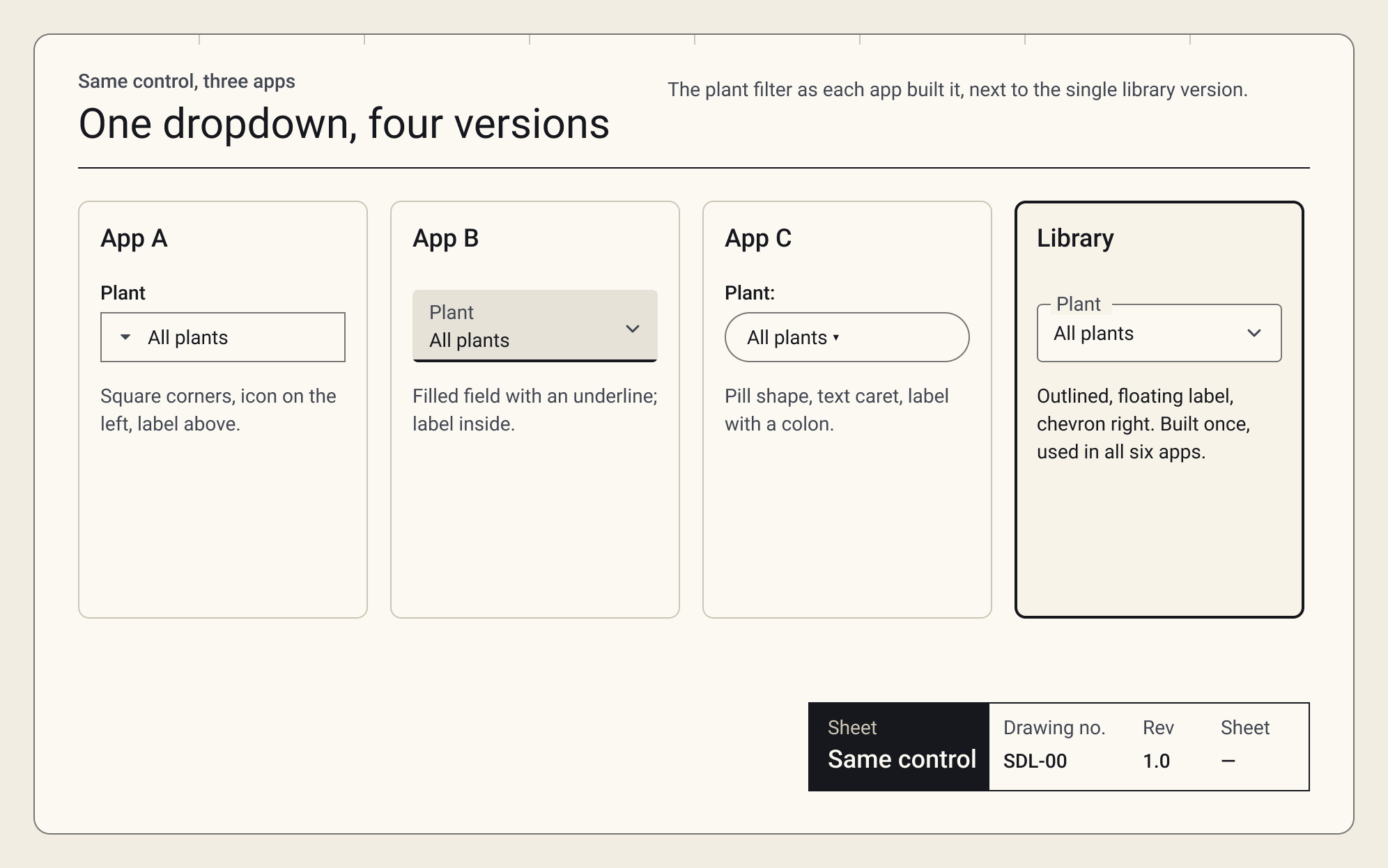
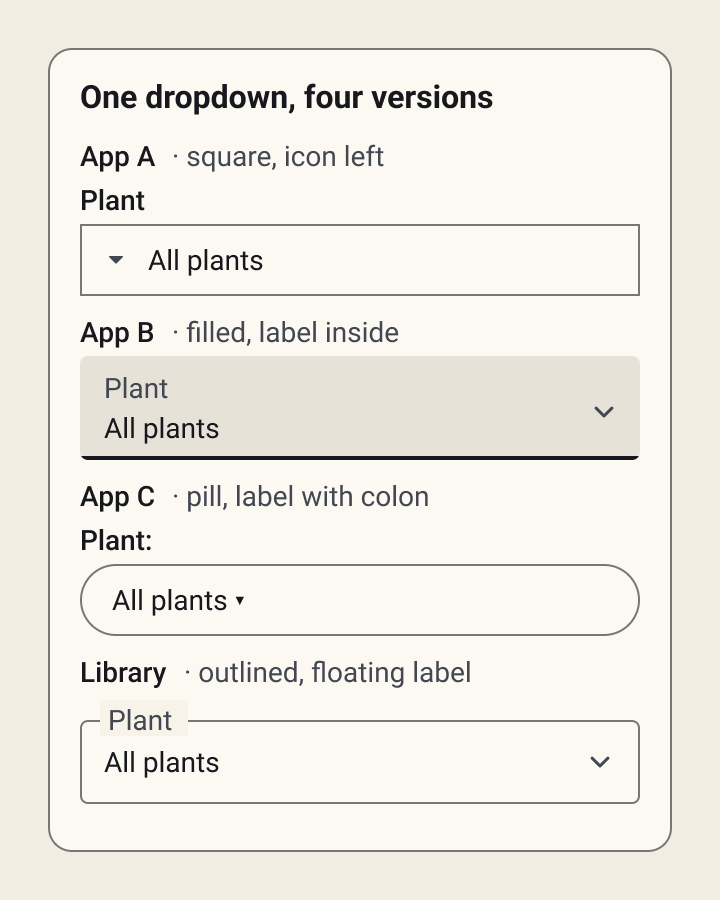
As our internal app portfolio grew, consistency got harder to keep. The same button, dropdown, or navigation drawer was rebuilt for each project, and each version behaved a little differently.
The existing library was a collection of references, not a working system. Designers and analysts copied old screens, developers interpreted them in MudBlazor, and small differences turned into rework during handoff.
How might we make consistency the easy default, so teams start from a shared foundation instead of a blank file?
Who it's for
A design system only works if the people using it can work with it. The library had to serve three very different groups:
- Developers need components they can trust without re-reading the code.
- Business analysts need a shared vocabulary to describe interfaces in requirements.
- Designers need a proven starting point, so reviews focus on the problem, not on spacing.
User journey
-
Stage 1: Starting a new pattern
Deciding what to build and where to begin.
Actions
- The developer reaches for whatever ships fastest.
- The business analyst describes the interface in a requirements doc.
- The designer starts a pattern meant for several teams.
Touchpoints
Code editor, requirements doc, design file
Feelings
Developer: rushed · Business analyst: unsure · Designer: overwhelmed
Roadblocks
- No single place to check before building
- No shared vocabulary for components
- No reusable components to start from
Opportunities
One documented library every contributor starts from.
-
Stage 2: Building without a source
Creating the screen with no shared reference.
Actions
- The developer copies and adapts an old component.
- The business analyst borrows screenshots from another team.
- The designer rebuilds the same component from scratch.
Touchpoints
Old codebase, other teams' screenshots, design file
Feelings
Developer: uncertain · Business analyst: improvising · Designer: frustrated
Roadblocks
- Components reused in ways they weren't built for
- References drift between teams
- Two teams solve the same problem differently
Opportunities
Reusable components with consistent names and shared tokens.
-
Stage 3: Review and handoff
Checking the work and passing it on.
Actions
- The developer ships the screen and waits for feedback.
- The business analyst hands requirements to design and development.
- The designer reviews against other teams' patterns.
Touchpoints
Pull request, requirements handoff, design review
Feelings
Developer: anxious · Business analyst: hopeful · Designer: drained
Roadblocks
- Token values guessed, not looked up
- Inconsistencies show up late, as rework
- Reviews spent on spacing, not substance
Opportunities
Standards and governance that cut review friction and rework.
A composite journey for three roles, based on conversations with the developers, analysts and designers on the app teams, and on watching the process itself.
Foundations
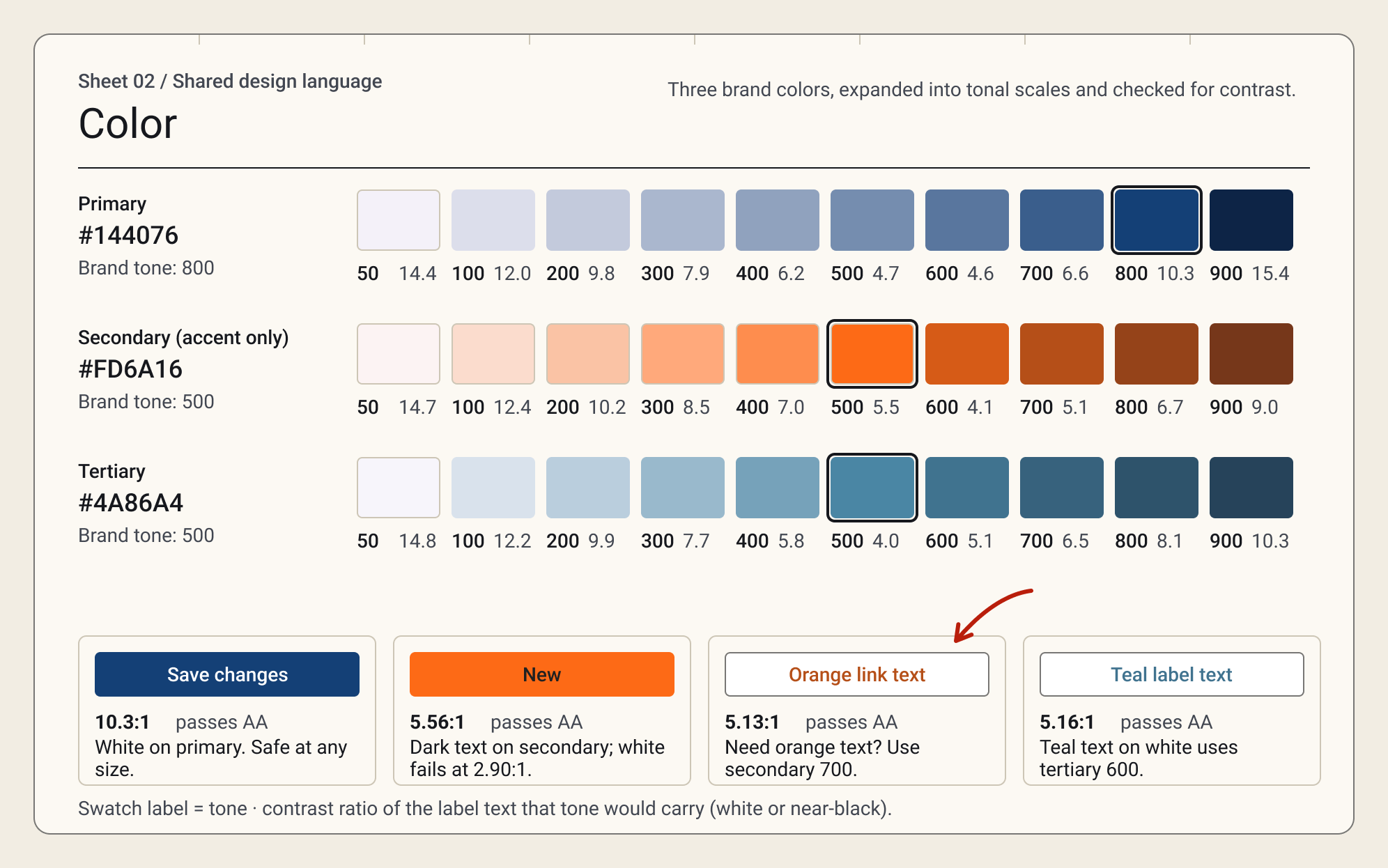
Before building components, I defined the foundations everything else depends on. We already used Material Design 2 and built in MudBlazor, so I matched every token to MudBlazor's theme properties. A design decision in Figma translates directly into code.
Key decisions
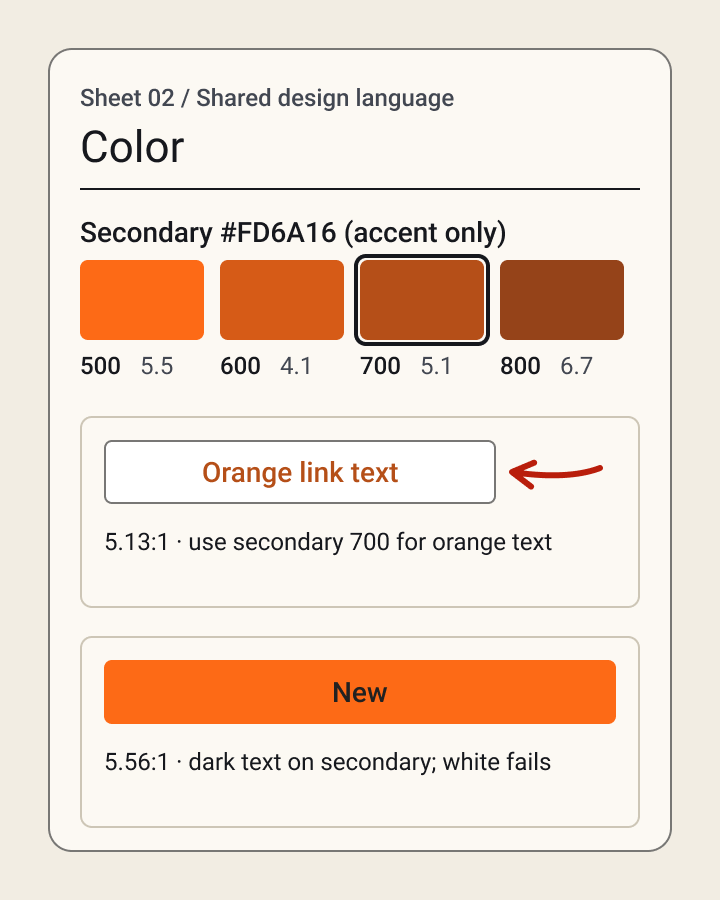
- Contrast-checked brand colors. White text on our orange failed the WCAG AA accessibility contrast check (2.9:1), so orange buttons use dark text, and a darker orange is saved for text.
- Warning moved to amber, so a status message never reads as our brand orange.
- One 4px corner radius for almost everything, matching MudBlazor's default.


Making prototypes more useful
I evolved components so they could power interactive prototypes, not just static wireframes. Concepts could be shown earlier, and stakeholders saw something close to the real experience before much development effort went in.
Interactive prototypes helped teams:
- Evaluate workflows before development
- Catch missing states and edge cases early
- Reduce misunderstandings during handoff
This supported a bigger shift: using design as a tool for discovery and agreement, not just documentation at the end of requirements gathering.
Governance, not just components
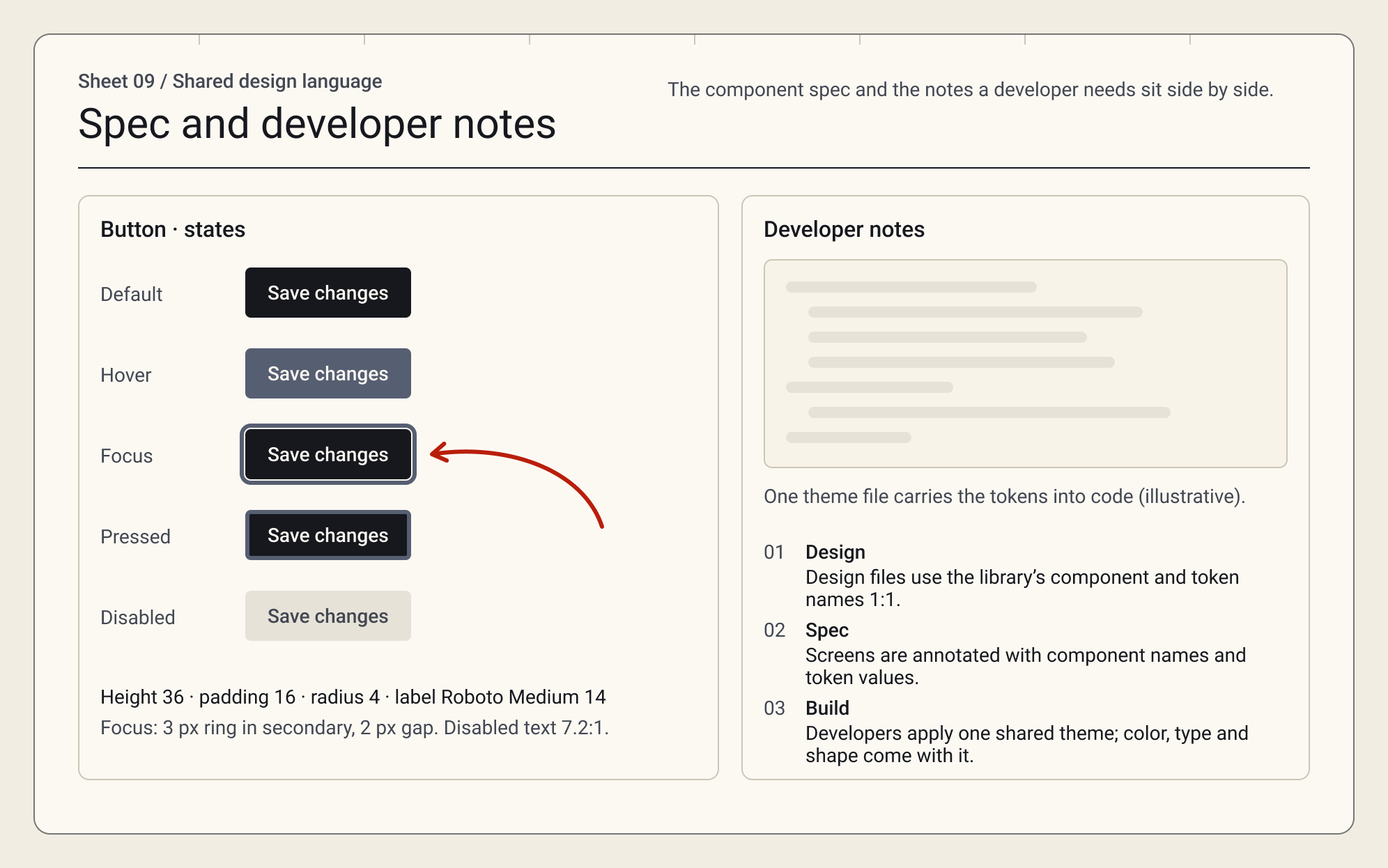
A library only stays consistent if there's a clear way to use and maintain it. I defined how the system moves from design to code: design files use MudBlazor component and token names, screens are specced with tokens instead of pixel values, and developers apply one shared theme file.
Before these standards, requirements lived in Azure DevOps while designs lived separately in Figma. Developers bounced between both or asked designers and analysts to clarify. I started documenting interaction behaviors, component states, and implementation notes right alongside the designs, giving developers the context they needed without the back-and-forth.
I also joined post-development reviews before User Acceptance Testing (UAT), comparing built screens against the intended designs and catching differences before business users started testing. Together, these practices made design a continuous part of delivery instead of a document handed off at the start.
- Less ambiguity. Teams have clearer guidance for common interface patterns.
- Faster design. Reusable components cut repetitive wireframing work.
- Better handoff. Design and development reference the same established patterns.

Design Outcomes
The library became the starting point for new internal apps, giving designers, analysts, and developers one shared reference from concept to handoff.
6 apps, one system
30+ shared components replaced app-by-app design decisions.
Built for the code we ship
Every token maps to a MudBlazor property, so design and development use the same names.
Prototypes before code
Reusable components made interactive prototypes faster, so stakeholders reviewed workflows before development.
Learnings
- A design library is most valuable when it cuts the number of decisions teams have to make from scratch.
- Reusable components only create consistency when their behavior, usage, and intent are clear enough for others to apply them correctly.
- Governance matters as much as the components. Shared standards, documentation, and ownership are what keep a design system going.
- Consistency should give teams a reliable foundation without stopping them from meeting the unique needs of each product and its users.
What I'd do next
- Track adoption. Measure how many new screens start from library components.
- Add dark mode and density options for data-heavy screens.
- Formalize contribution. A simple way for teams to propose new patterns.
Let's talk
Hiring a Senior UX / Product Designer?
I'm open to remote Senior UX / Product Designer roles, full-time or contract. Bring me the workflow everyone complains about. I'll bring the questions, the prototypes and, on a good day, a truly excellent dad joke.
simplywandee@gmail.com