Scheduled Weld Drawings
Replacing a print-and-deliver paper process with a barcode scan that pulls up the right welding drawing on the floor.
- Problem
- Support staff searched network folders, printed drawings, and walked them to welders. Paper copies got lost or damaged, and welders waited.
- My Role
- UX research, UX/UI design, business analysis, project management, and robotic process automation (RPA) development · 3 months
- Tools
- Automation Anywhere (RPA) · Microsoft Forms · Power Automate · Network file storage
- Outcome
- Piloted on the manufacturing floor. Drawing retrieval dropped from 5–10 minutes to about 30 seconds, with positive feedback and interest in applying it to other paper-based processes.
The Challenge
Welders relied on paper drawings. When they needed one, support staff searched network folders by hand, printed it, and carried it to the floor. Paper copies were easily misplaced or damaged, and every delay meant welders standing by instead of working.
How might we get welders the right drawing, right away, without adding a new process for them to learn?


Who it's for
I interviewed and observed five welders on the manufacturing floor to understand how drawings moved from the network drive to the work. Three problems kept coming up:
- Slow drawing retrieval. Finding the right drawing in network folders took too much time.
- Unreliable paper records. Paper drawings were easily misplaced, damaged, or lost.
- Time-heavy delivery. Support staff spent significant time finding, printing, and delivering drawings.
The barcode on every part was already part of the welders' work. That became the key: retrieval could start from something they already handled every day.
-
Welder
Depends on having the correct drawing at the bay. Any delay or error stalls the whole job.
Needs to
- Get the right drawing without waiting on anyone
- Trust that the drawing in hand is correct
- Get back to welding fast
Pain points today
- Waits on support staff to find and deliver drawings
- Works from paper copies that get damaged or lost
- Stands by while drawings are printed and delivered
What the design gives them
- Scan the barcode to pull up the drawing
- Manual entry and help when a scan fails
-
Production support
Fields drawing requests from the floor, and spends the day finding, printing, and delivering paper.
Needs to
- Answer drawing requests without leaving the desk
- Stop hunting through network folders
- Only step in when something goes wrong
Pain points today
- Searches network folders by hand for each request
- Prints and walks every drawing to the bay
- Reprints drawings that were lost or damaged
What the design gives them
- Welders find drawings themselves
- Help requests come in only when a lookup fails
The welder persona is based on interviews and observation with five welders. The production support persona represents the support staff who handled drawing requests.
User journey
-
Stage 1: Locate the drawing
Finding the right file for the part.
Actions
- Production support searches network folders by hand.
- The welder requests the drawing and waits.
Touchpoints
Network folders, phone or in person
Feelings
Production support: frustrated · Welder: waiting
Roadblocks
- Finding the correct drawing takes too long
- The welder can't look it up alone
Opportunities
Scan the part's barcode to pull up the drawing right away.
-
Stage 2: Handle the paper
Printing the drawing and keeping the copy usable.
Actions
- Production support prints the drawing from the file.
- The welder works from a copy that can get damaged.
Touchpoints
Printer, paper drawing
Feelings
Production support: cautious · Welder: unsure it's current
Roadblocks
- Paper drawings get misplaced or damaged
- No quick way to confirm it's the right one
Opportunities
Confirm the right drawing the moment it opens, with no paper.
-
Stage 3: Deliver to the floor
Getting the drawing to the welder's bay.
Actions
- Production support carries the drawing out to the bay.
- The welder stands by until it arrives.
Touchpoints
Walk to the floor, in-person handoff
Feelings
Production support: rushed · Welder: losing time
Roadblocks
- Time lost locating and delivering
- Production pauses while welders wait
Opportunities
The drawing on the spot, in about 30 seconds.
Initial concepts
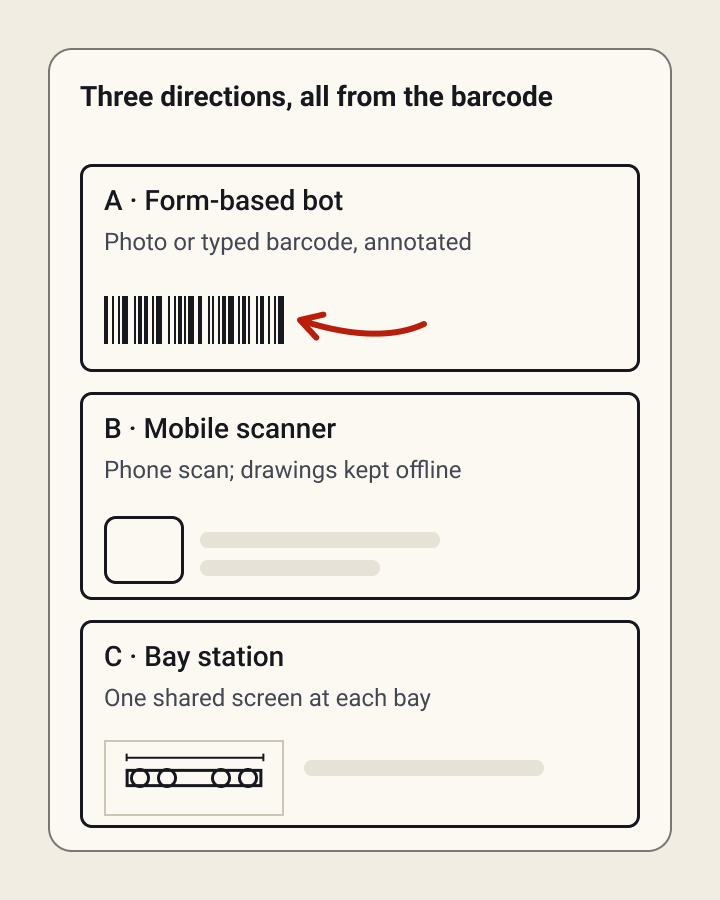
Instead of asking welders to learn a new retrieval process, I built the concept around information already on the physical barcode. A welder scans it to pull up the matching drawing, with manual entry as a fallback.
I explored three directions:
- A form-based bot
- A mobile scanner
- A bay station: a shared screen at each bay showing today's parts, with a recovery path when a scan doesn't match.
The bot and the scanner both included manual entry, help requests, and error handling for failed scans. The bay station had its own recovery path for a scan with no match.

Final design: designing within constraints
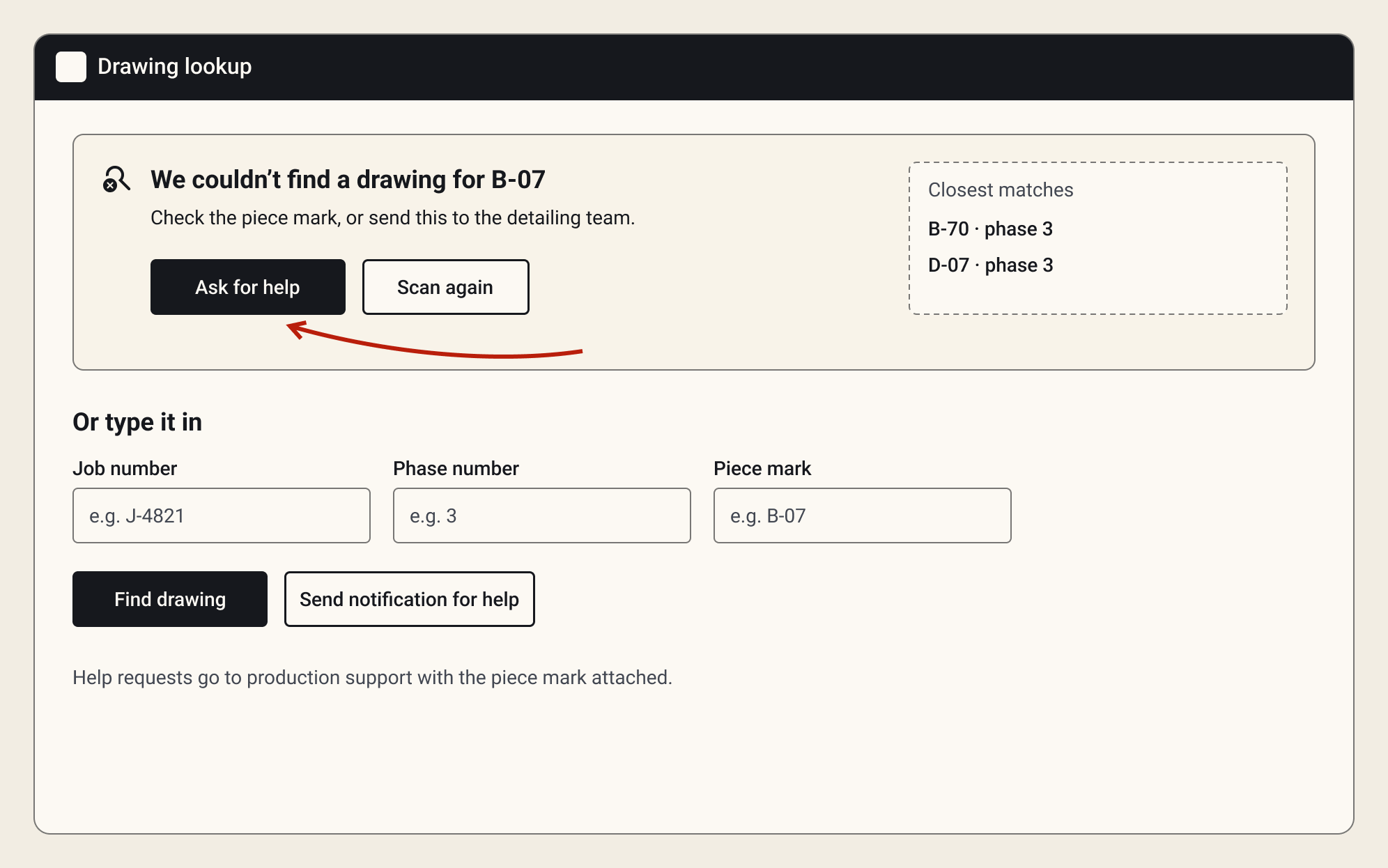
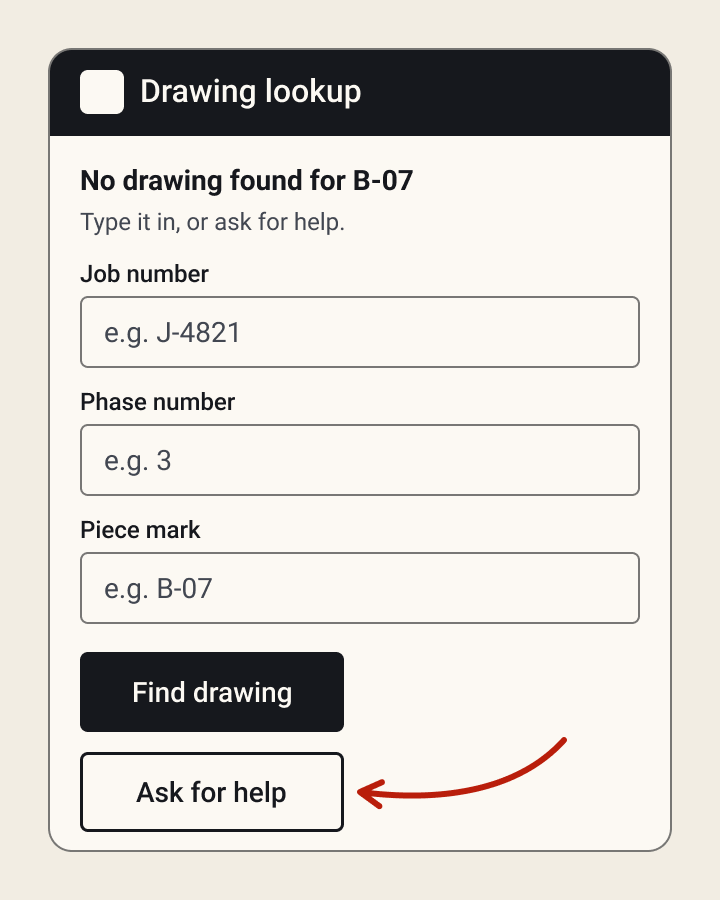
The final design had to work within the RPA tool's limits, not just the ideal experience. Several concepts assumed flexibility the platform couldn't support, so I narrowed to the one design that was both usable for welders and reliable to automate.
Key decisions
- Barcode scan as the main entry point, because welders already handle the barcode.
- Manual entry as a fallback for scratched or smudged barcodes.
- A help button, so a failed lookup never leaves a welder stuck.
- No separate preview screen. Pulling up the drawing already gave welders a natural point to confirm they had the right one, so a preview would have added friction without adding value.


Design Outcomes
The pilot replaced several manual steps (searching, printing, and delivering) with a direct scan between the welder and the drawing they needed.
Drawing retrieval dropped from 5–10 minutes to about 30 seconds. Welders responded positively, and stakeholders asked about applying the same approach to other paper-based processes.
5–10 min became about 30 sec
Drawing retrieval time, from searching network folders to one barcode scan.
Piloted on the floor
Tested with welders in real conditions, with interest in expanding to other paper-based processes.
5 roles, 1 person
Research, design, business analysis, project management, and RPA development, delivered in 3 months.
Learnings
- Automation works best when it removes friction without changing how people think about the task. Building around something they already used, the barcode, was a much smaller change than introducing an entirely new process.
- Design the exception path alongside the ideal one. Manual entry and help options stayed necessary because the workflow still had to work when scanning failed.
What I'd do next
- Expand user testing. Test with welders across the remaining manufacturing plants to find differences in workflows and environments.
- Refine for the floor. Use more feedback to improve scanning, manual entry, error handling, and accessibility in the manufacturing environment.
- Explore broader automation. Find other paper-based manufacturing workflows where the same approach could cut manual work.
Let's talk
Hiring a Senior UX / Product Designer?
I'm open to remote Senior UX / Product Designer roles, full-time or contract. Bring me the workflow everyone complains about. I'll bring the questions, the prototypes and, on a good day, a truly excellent dad joke.
simplywandee@gmail.com